
Organized communication. Calm by design.
Central Huddle unifies Gmail, Outlook, and Slack into isolated workspaces with native macOS notifications, menu bar controls, and distraction free focus.
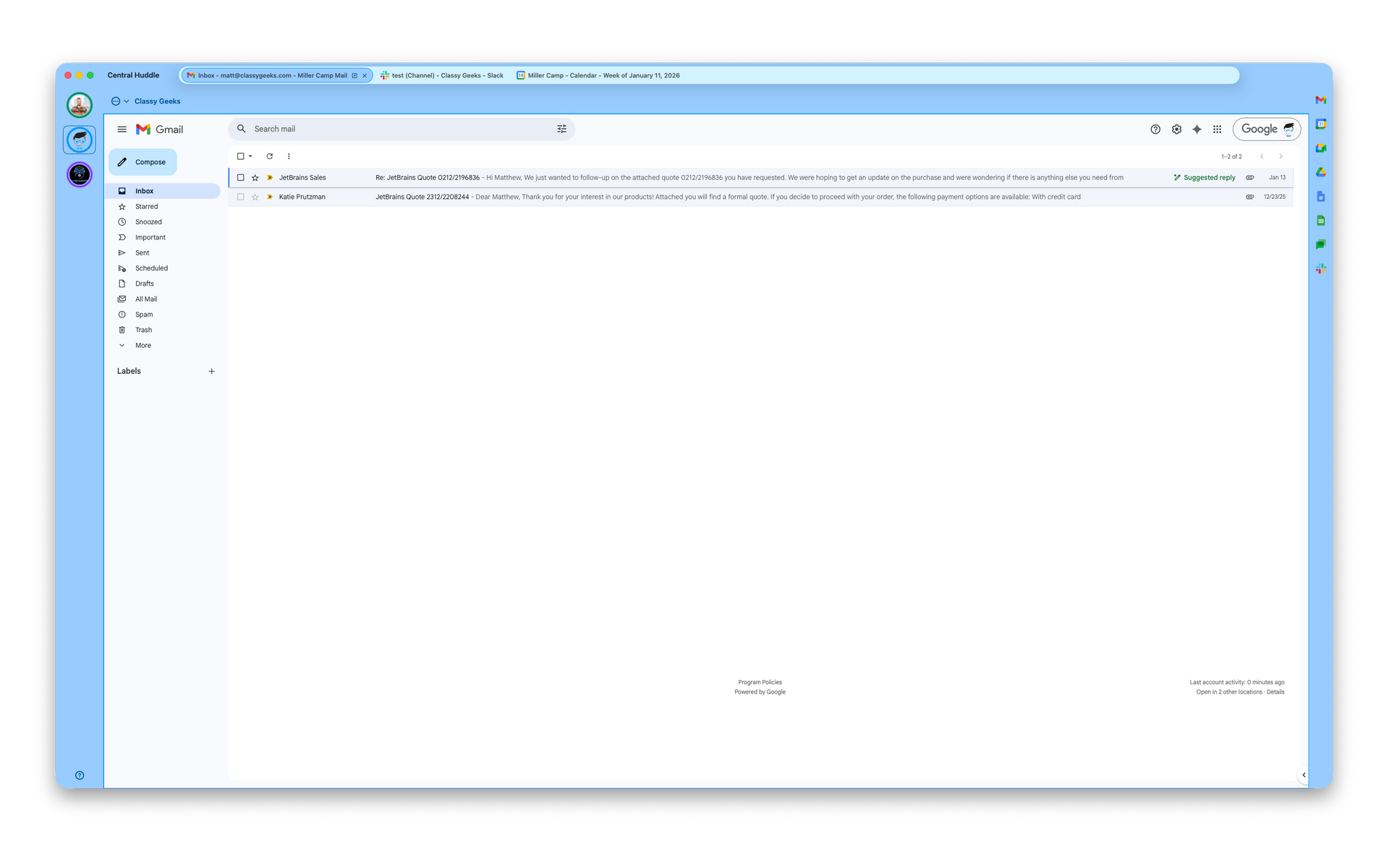
Central Huddle unifies Gmail, Outlook, and Slack into isolated workspaces with native macOS notifications, menu bar controls, and distraction free focus.
Central Huddle is a focused communication hub for modern work on macOS. It brings your most important conversations, files, and meetings into one calm, organized space without mixing accounts or overwhelming your day.
With Central Huddle, you can create multiple workspaces, each fully isolated from the others and visually distinct. Every workspace can be color coded for instant recognition, making it easy to identify personal, client, or company environments at a glance. Each workspace can include its own Gmail, Microsoft Outlook, Slack, Google Chat, or Microsoft Teams tabs, along with direct access to Google Drive and meeting tools. No cross account leakage and no accidental replies from the wrong inbox.
Central Huddle keeps meetings and collaboration tightly connected to the work they belong to. Google Meet and Microsoft Teams meetings live inside the workspace where conversations and files already exist. Google Drive integration keeps shared documents and project files one click away, right where decisions are happening.
Central Huddle delivers native macOS notifications that are workspace aware. Important messages surface immediately while less urgent communication stays quiet. Color coding extends into notifications and navigation, helping you instantly understand which workspace needs attention without breaking focus.
The menu bar experience provides at-a-glance visibility into all of your workspaces. Color indicators show activity levels, let you jump directly into the right workspace, and make it easy to control focus. Built in Do Not Disturb controls allow you to silence distractions per workspace while staying productive elsewhere.
Multiple Isolated Workspaces
Create separate workspaces for personal, client, and company communications with full account isolation.
Account Isolation by Design
Each workspace keeps Gmail, Outlook, and Slack sessions fully separated; no cross account leakage or accidental replies.
Gmail, Outlook, and Slack Support
Add Gmail, Microsoft Outlook, and Slack tabs to any workspace for unified access to core communication tools.
Google Drive Integration
Access Google Drive directly inside workspaces for fast file sharing and collaboration.
Google Meet Support
Join and host Google Meetings directly within Central Huddle.
Google Chat Integration
Use Google Chat alongside Gmail and Drive inside the same workspace.
Microsoft Teams Meeting Support
Join Teams Meetings without leaving your workspace context.
Slack Huddles Support
Start or join Slack Huddles directly inside Central Huddle.
Native macOS Notifications
Receive system level notifications for important messages and events.
Workspace Aware Notifications
Notifications stay scoped to the correct workspace for clarity instead of noise.
Menu Bar Workspace Overview
View all workspace activity at a glance directly from the macOS menu bar.
Do Not Disturb
Silence distractions with the click of a button.
Fast Workspace Switching
Instantly switch between workspaces while preserving session state.
Session Persistence
Stay signed in to all accounts across restarts and workspace switches.
Color Coded Workspaces
Assign unique colors to each workspace for quick visual identification.
Low Distraction Interface
Clean, minimal UI designed to reduce cognitive load and improve focus.
Native macOS Performance
Built specifically for macOS for speed, stability, and low system overhead.
Privacy First Architecture
Credentials and sessions are protected by macOS security and never shared across workspaces.
Secure Embedded Browsing
Uses isolated WebKit contexts per workspace for strong security boundaries.
Quick Navigation Controls
Jump to Gmail, Slack, Drive, or Meetings in one click.
Enhanced Menu Bar Controls
Start or stop attention, toggle Do Not Disturb, and jump into workspaces instantly.
Multiple Account Sign In
Stay signed into multiple Gmail, Outlook, and Slack accounts simultaneously.
Professional Grade Workflow Design
Purpose built for founders, consultants, managers, and distributed teams.
Native macOS Notifications
Receive real system level macOS notifications for messages, mentions, and important events.
Workspace Aware Notifications
Notifications are scoped to the correct workspace, keeping alerts organized and preventing cross account confusion.
Menu Bar Workspace Overview
View all workspace activity at a glance directly from the macOS menu bar.
Central Huddle is not another chat app. It is a control center for your work communication.
Works With

"I love being able to color code workspaces, control notifications per workspace, and see everything from the menu bar. Central Huddle keeps my day focused instead of chaotic. I didn’t realize how much mental load it removed until I started using it."
"I juggle multiple Gmail and Slack accounts every day, and Central Huddle keeps everything separated and calm. No more logging in and out or worrying about replying from the wrong account. It feels like macOS finally has the communication tool it should have had all along."
"I manage internal teams and external partners, and account separation is critical. Central Huddle’s workspaces, native notifications, and menu bar controls let me stay responsive without being overwhelmed. It’s clean, fast, and clearly built by people who understand how professionals work."
"I love being able to color code workspaces, control notifications per workspace, and see everything from the menu bar. Central Huddle keeps my day focused instead of chaotic. I didn’t realize how much mental load it removed until I started using it."
"I juggle multiple Gmail and Slack accounts every day, and Central Huddle keeps everything separated and calm. No more logging in and out or worrying about replying from the wrong account. It feels like macOS finally has the communication tool it should have had all along."
Why Choose Central Huddle
True Workspace Isolation
Each workspace is fully separated from the others, with its own accounts, sessions, and notifications. Keep personal, client, and company communications completely isolated with no risk of cross account mistakes.
One Hub for All Critical Communication
Central Huddle brings Gmail, Microsoft Outlook, Slack, Google Meet, Teams Meetings, and Google Chat into a single focused workspace. Everything important lives in one place without constant context switching.
Multiple Accounts Without Compromise
Stay signed into multiple accounts at the same time across services. No logouts, no browser profiles, no confusion. Each workspace remembers its state exactly as you left it.
Color Coded Workspaces for Instant Clarity
Every workspace can be color coded for quick visual identification. Instantly recognize which role, client, or team you are working in at a glance.
Native macOS Notifications That Respect Focus
Receive native macOS notifications that are workspace aware and intentional. Stay informed about what matters without being overwhelmed by noise.
Powerful Menu Bar Control
See activity across all workspaces directly from the menu bar. Jump into conversations, monitor attention, or enable Do Not Disturb without opening the full app.
Do Not Disturb That Actually Works
Silence distractions per workspace while allowing important communication to come through. Stay productive without missing what truly matters.
Built for Speed and Stability on macOS
Central Huddle is designed specifically for macOS, delivering fast performance, low system overhead, and smooth native behavior.
Privacy First by Design
Credentials and session data are protected using macOS security features. Your communication stays private and local to your system.
Perfect for Modern Professionals
Whether you manage multiple teams, clients, or roles, Central Huddle is built for people who need clarity, separation, and control in their daily communication.
Frequently Asked
Questions
-
What is Central Huddle?
Central Huddle is a focused communication hub for macOS that brings email, chat, and meeting tools into organized, isolated workspaces. It helps you manage multiple accounts and roles without distractions or account overlap.
-
Does Central Huddle have a free trial
Yes, you can try Central Huddle for free for one workspace, for 7 days.
-
Which services does Central Huddle support?
Central Huddle supports Gmail, Microsoft Outlook, Slack, Google Meet, Microsoft Teams Meetings, Google Chat, and Google Drive. Additional services may be added over time.
-
Can I use multiple accounts at the same time?
Yes. You can stay signed into multiple accounts simultaneously across all supported services. Each workspace maintains its own sessions so you never need to log in and out.
-
What is a workspace?
A workspace is an isolated environment with its own accounts, tabs, notifications, and settings. Workspaces are ideal for separating personal, client, and company communication.
-
How does workspace isolation work?
Each workspace is fully separated at the session level. Accounts, cookies, and notifications never leak between workspaces, preventing accidental cross account actions.
-
Can I customize my workspaces?
Yes. Workspaces can be color coded for quick identification, renamed, and organized to match how you work.
-
Does Central Huddle support notifications?
Yes. Central Huddle delivers native macOS notifications that are workspace aware, helping you stay informed without unnecessary noise.
-
What is Do Not Disturb in Central Huddle?
Do Not Disturb allows you to silence notifications per workspace while keeping others active. This gives you control over focus without missing critical communication.
-
Does Central Huddle work from the menu bar?
Yes. The menu bar provides quick visibility into all workspaces, activity indicators, and fast navigation without opening the main window.
-
Is Central Huddle secure?
Yes. Central Huddle uses macOS security features to protect credentials and session data. Your information remains private and local to your device.
-
Does Central Huddle track or store my messages?
No. Central Huddle does not read, store, or analyze your messages. It simply provides a secure interface to the services you already use.
-
Is Central Huddle a browser?
No. Central Huddle is a purpose built macOS application designed specifically for focused communication. It avoids the clutter, overhead, and distractions of traditional browsers.
-
Who is Central Huddle for?
Central Huddle is ideal for professionals managing multiple roles, clients, or teams who need clarity, separation, and control in their daily communication.
-
Is Central Huddle free?
Central Huddle includes a free trial so you can experience the full product before subscribing. Subscription options are available through the Mac App Store.
-
Title or question
Describe the item or answer the question so that site visitors who are interested get more information. You can emphasize this text with bullets, italics or bold, and add links. -
I need help, who can I talk to?
We support our customers in a human way, just email hello@classygeeks.com
Pricing For All
Support for one workspace, including Gmail, Outlook and Slack
Free updates for a year
$50 / year
Starter
Support for three workspace, including Gmail, Outlook and Slack
Free updates for a year
$70 / year
Business
Enterprise
Support for unlimited workspaces, including Gmail, Outlook and Slack
Free updates for a year